woo_client
A WooCommerce client for Dart: the public Store API for carts and checkout with no API keys, and the full admin REST API. Typed, batched, and tested.
woo_client
A WooCommerce client for Dart. Both of WooCommerce's APIs — the public Store API for shoppers, and the admin REST API for everything else.
// No API keys. This is what a shipped app should use.
final store = WooStore(baseUrl: 'https://your-store.com');

await store.cart.addItem(id: 799, quantity: 2);
final cart = await store.cart.get();

print(cart.totals.totalPrice);   // $82.56
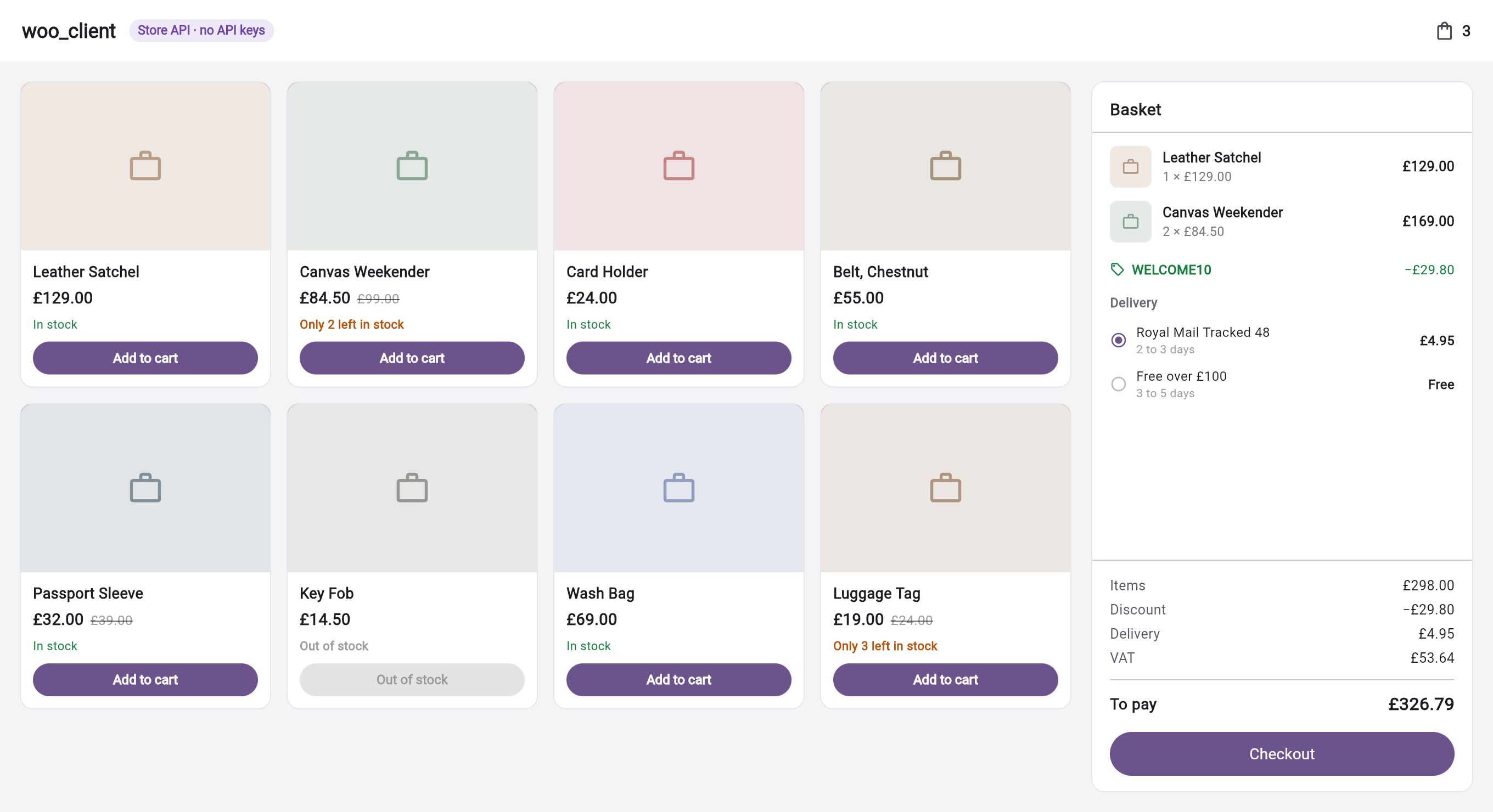
Every price above came off the wire as an integer — "12900" — and printed itself in the store's own currency format. The stock lines are the store's own wording. Source in storefront/.
Pure Dart, so it runs in Flutter, on a server, and in a CLI. Three dependencies, all from the Dart team.
Which API you want
WooCommerce has two, and picking the wrong one is the single most expensive mistake in a Flutter storefront.
WooStore — Store API | WooCommerce — admin API | |
|---|---|---|
| Credentials | None | Consumer key, or an application password |
| Can see | The public catalogue, and the caller's own cart | Everything: every customer, every order, every setting |
| Cart & checkout | Yes | No |
| Safe in a shipped app | Yes | No |
| Use it for | A shopper's app or storefront | A server, a CLI, an admin tool |
Anything you ship to a device can be read off that device. A consumer key in a Flutter app is your whole store, handed to anyone who downloads it — no amount of obfuscation changes that. The Store API exists precisely so you do not need one.
To be exact about what is and is not new here. woocommerce_plugin (2026) also implements the Store API properly — cart, checkout, shipping rates and Cart-Token sessions. Two long-abandoned packages (woocommerce, 2020, and its fork flutter_wp_woocommerce, 2022) call a handful of cart endpoints without a Cart-Token, so both depend on a cookie session and neither works from an app.
What is different here is the credential model. woocommerce_plugin requires username and password in its only constructor, so the key is compiled into your binary whichever endpoint you end up calling. WooStore(baseUrl: ...) takes no credential at all, and the storefront type is separate from the admin one, so there is nothing to leak.
If you need admin data in a shipped app, put your own backend in front and use WooCredentials.bearer against it.
Install
dart pub add woo_client
The Store API
Browsing
final page = await store.products.list(
  search: 'beanie',
  category: 21,
  orderBy: StoreProductOrderBy.popularity,
);

page.totalItems;   // 57, from the store's own header
page.hasMore;      // true

final product = await store.products.get(799);
final linked = await store.products.bySlug('beanie-with-logo');  // deep links
final categories = await store.products.categories();
Money that prints itself
The Store API sends prices as integer minor units — "1800" is eighteen dollars — with the store's own symbol, separators, and prefix alongside. A client that ignores that shows $1800.
print(cart.totals.totalPrice);         // $82.56
cart.totals.totalPrice.minorUnits;     // 8256
cart.totals.totalPrice.amount;         // 82.56

// Arithmetic is on integers, so it is exact.
final subtotal = item.price * item.quantity;
It respects the store's own settings, not your locale: a euro store gets 1.234,56 €, a yen store gets ¥1,800 with no decimal part at all.
The cart
Every cart call returns the whole cart, because that is what the store sends — adding one item can change shipping, tax, and which coupons still apply.
await store.cart.addItem(id: 799, quantity: 2);
await store.cart.addItem(
  id: variation.id,
  variation: product.cartAttributes({'Colour': 'blue'}),
);
await store.cart.updateItem(key: item.key, quantity: 3);
await store.cart.removeItem(item.key);
await store.cart.applyCoupon('SAVE10');

// Several at once: one request and one recalculation, not one of each per item.
await store.cart.addItems({799: 1, 812: 2, 815: 1});
Quantity limits come with the cart, and know about minimums and multiples — so a stepper built on them cannot ask for something the store will refuse:
item.limits.clamp(3);    // 4, if the product is sold in twos
item.limits.clamp(99);   // 12, if that is all the stock there is
Shipping
A country and a postcode are enough to get quotes; you do not need a full address.
final cart = await store.cart.updateCustomer(
  shippingAddress: StoreAddress(postcode: 'N1 7GU', country: 'GB'),
);

for (final package in cart.shippingPackages) {
  for (final rate in package.rates) {
    print('${rate.name} — ${rate.price}');   // Flat rate — $13.00
  }
}

await store.cart.selectShippingRate(packageId: 0, rateId: 'flat_rate:10');
Checkout
final result = await store.checkout.submitAndClear(
  billingAddress: address,
  paymentMethod: 'stripe',
  expectedTotal: cart.totals.totalPrice,
);

if (result.paymentResult.needsRedirect) {
  // PayPal and friends finish off-site. Not paid until they come back.
  await launchUrl(Uri.parse(result.paymentResult.redirectUrl));
} else if (result.isPaid) {
  showThanks(result.orderId);
}
Pass expectedTotal — the number you actually showed the shopper — and the store refuses the order if it no longer agrees, rather than charging a different amount than the one on screen:
try {
  await store.checkout.submit(..., expectedTotal: shownTotal);
} on WooTotalMismatchException catch (e) {
  // Nothing was charged, and the new total is already here.
  final fresh = StoreCheckoutResource.cartFrom(e);
  await confirmAgain(fresh!.totals.totalPrice);
}
submitAndClear forgets the cart only when the payment actually went through — a declined card leaves the basket intact.
Keeping the basket
Carts are identified by a Cart-Token the store issues on the first request. This client captures it and replays it for you. To keep a shopper's basket across app launches, give it somewhere to write:
class PrefsCartTokens implements CartTokenStore {
  PrefsCartTokens(this._prefs);
  final SharedPreferences _prefs;

  @override
  Future<String?> read() async => _prefs.getString('woo_cart_token');

  @override
  Future<void> write(String? token) async => token == null
      ? await _prefs.remove('woo_cart_token')
      : await _prefs.setString('woo_cart_token', token);
}

final store = WooStore(
  baseUrl: 'https://your-store.com',
  tokens: PrefsCartTokens(prefs),
);
A cart token also removes the nonce requirement — which matters, because a nonce can only be minted by WordPress itself, so an app has no way to produce one. Token-based is the only workable flow for a client that is not a web page on the store's own domain.
The admin API
final woo = WooCommerce(
  baseUrl: 'https://your-store.com',
  credentials: WooCredentials.key(consumerKey: ck, consumerSecret: cs),
  retry: const WooRetry.reads(),
);

final page = await woo.products.list(search: 'leather', onSale: true);
final order = await woo.orders.get(5120);
Products, orders, customers and coupons have named filters. Everything else lives under woo.admin:
woo.admin.productCategories    woo.admin.taxRates        woo.admin.reports
woo.admin.productTags          woo.admin.shippingZones   woo.admin.settings
woo.admin.productAttributes    woo.admin.shippingClasses woo.admin.data
woo.admin.reviews              woo.admin.webhooks        woo.admin.systemStatus()

woo.admin.attributeTerms(3)    woo.admin.orderNotes(5120)  woo.admin.refunds(5120)
woo.admin.paymentGateways()    woo.admin.taxClasses()
Each is a WooCollection, so they all get the same list / get / create / update / delete / all() / batch() — not just the ones someone got round to.
Batch
Up to 100 operations in one request. For a catalogue sync this is the difference between a minute and an hour.
final result = await woo.products.batch(
  update: [
    {'id': 799, 'regular_price': '119.00'},
    {'id': 812, 'stock_quantity': 0},
  ],
  delete: [800],
);

result.updated;   // List<WooProduct>
Over 100 it throws rather than letting WooCommerce silently truncate, which looks like data loss.
Writing orders
final order = await woo.orders.create(
  lineItems: [
    WooLineItem.order(productId: 799, quantity: 2),
    WooLineItem.order(productId: 812, quantity: 1, variationId: 815),
  ],
  billing: WooAddress(firstName: 'Ada', country: 'GB', email: 'ada@example.com'),
  paymentMethod: 'stripe',
  setPaid: false,
);

await woo.orders.setStatus(order.id, WooOrderStatus.completed);
WooLineItem.order deliberately sends only the product and the quantity. The store applies its own prices, taxes, and coupons — a client that sends a price is a client that can be told to send 0.01.
Authentication
WooCredentials.key(consumerKey: ck, consumerSecret: cs)   // a store credential
WooCredentials.applicationPassword(username: u, password: p)  // WordPress core
WooCredentials.bearer(token)                              // your backend, or JWT
Application passwords are built into WordPress since 5.6, can be revoked individually, and run as a real user — so a shop manager cannot do what an administrator can, and the audit trail names them.
Both consumer keys and application passwords are refused over plain http://, with an ArgumentError rather than a leaked secret.
Webhooks
WooCommerce POSTs to your server when things happen. Anyone can POST to your endpoint, so check the signature before you believe the body — without it, a stranger can tell your system an order was paid.
final delivery = WooWebhookDelivery.fromRequest(
  body: await request.readAsString(),   // the exact bytes, not re-encoded
  headers: request.headers,
);

if (!delivery.isSignedWith(secret)) return Response.forbidden('nope');

switch (delivery.topic) {
  case 'order.created':
    await handle(WooOrder.fromJson(delivery.json));
  case 'product.updated':
    await reindex(delivery.resourceId);
}
The comparison is constant-time. Nothing else in Dart does this today.
Errors
try {
  await woo.products.get(id);
} on WooNotFoundException {
  return null;
} on WooRateLimitException catch (e) {
  await Future.delayed(e.retryAfter ?? const Duration(seconds: 30));
} on WooAuthException catch (e) {
  log('Key rejected: ${e.message}');
} on WooInvalidRequestException catch (e) {
  log('Store said no: ${e.code} ${e.details}');
} on WooServerException {
  return retryLater();
} on WooNetworkException catch (e) {
  log('Never reached the store: ${e.cause}');
} on WooBadResponseException catch (e) {
  log('Not JSON: ${e.body}');       // a plugin printing a notice, or a login wall
}
All eight extend WooException, which is sealed — a switch over an error is exhaustive, and a new case is a compile error rather than a silent fall-through.
Retrying
Off by default, because this package cannot know whether your POST is safe to repeat.
WooRetry.none()         // the default
WooRetry.reads()        // GETs only — what almost everyone wants
WooRetry.everything()   // only if every call you make is idempotent
Retries back off exponentially with jitter, and honour the store's own Retry-After rather than guessing shorter and getting refused again.
Testing your own code
Pass any http.Client:
final store = WooStore(
  baseUrl: 'https://example.com',
  httpClient: MockClient((request) async => http.Response(
    jsonEncode(cartFixture), 200,
    headers: {'content-type': 'application/json', 'Cart-Token': 't'},
  )),
);
Anything not wrapped
Both clients expose the raw routes, with the same auth, paging, and errors:
await woo.getPage('/customers/33/downloads');
await woo.getPage('/reports/sales', query: {'period': 'month'});
await store.getOne('/products/collection-data');
And every model keeps the full response in .raw, so a plugin's field is a map lookup rather than a release away:
product.raw['_yoast_wpseo_title'];
cart.raw['extensions'];
Compatibility
- Store API — WooCommerce 8.0+, where it ships in core. No plugin needed.
- Admin API — WooCommerce 3.5+ (REST v3), any WordPress that runs it.
- HTTPS required for key and application-password authentication.
---
Not affiliated with or endorsed by Automattic. WooCommerce is their trademark; this is an independent client for their public APIs.