roomplan
Scan a room with Apple's RoomPlan and get walls, doors, windows and furniture with real dimensions, a USDZ model, and a floor-plan widget.
roomplan
Scan a room with Apple's RoomPlan and get it back as data.
final controller = RoomScanController();

// Ask first. Most iPhones cannot do this.
final support = await RoomScanController.support();
if (!support.supported) { /* support.reason tells you why */ }

RoomScanView(controller: controller);

await controller.start();
// …the user walks the room…
await controller.stop();

controller.rooms.listen((room) {
  print('${room.walls.length} walls, ${room.objects.length} objects');
  print(room.usdzPath); // a USDZ model of what was scanned
});
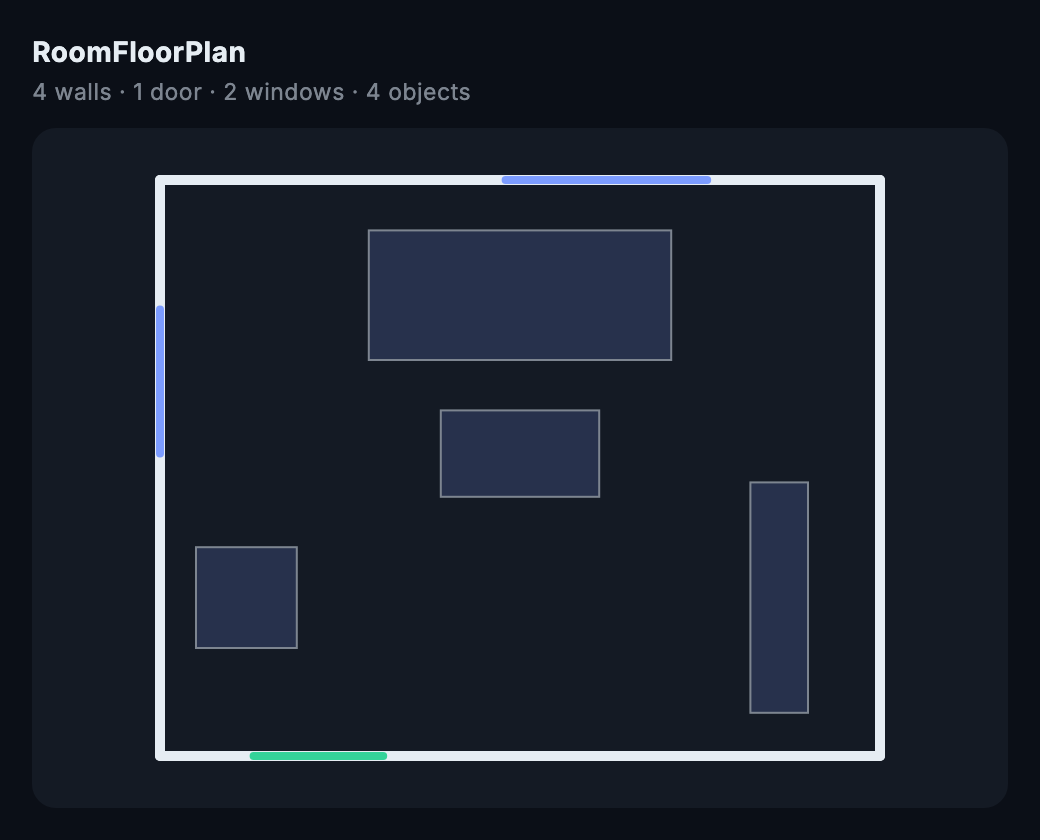
The RoomFloorPlan widget. The geometry above is the sample room from the test suite — a real scan needs LiDAR, and this package does not illustrate itself with hardware it has not run on.
Setup
RoomPlan uses the camera, so the host app must declare why. Without this iOS terminates the app the instant a scan starts — not a permission dialog, a crash.
Add to ios/Runner/Info.plist:
<key>NSCameraUsageDescription</key>
<string>Scanning a room uses the camera and the LiDAR sensor to measure it.</string>
Requires iOS 16 and a device with LiDAR. RoomScanController.support() tells you which of those is missing, and RoomScanView shows its fallback rather than a black rectangle when the device cannot scan.
Seeing the room
A CapturedRoom is geometry: transforms and extents in metres. Useful, but not something a person can look at. RoomFloorPlan projects it onto the floor and draws it:
RoomFloorPlan(room: room, style: FloorPlanStyle(wall: Colors.white));
Walls, doors, windows and openings each get their own colour, furniture is drawn as its footprint with the right rotation, and the whole plan scales to fit whatever box you put it in. Usually the first thing an app wants to do with a scan, and fiddly enough — column-major transforms, metres to pixels, fitting to the widget — to be worth doing once.
What you get
Not a point cloud — a parametric model. RoomPlan post-processes the scan into squared-off walls with real dimensions, and identifies what it found:
walls, floors | surfaces with metre dimensions and a transform |
doors, windows, openings | found within the walls |
objects | recognised furniture — chair, table, bed, storage… |
usdzPath | a USDZ model, ready for AR Quick Look |
raw | RoomPlan's own encoding, untouched |
Every dimension is in metres, and position is read out of the transform rather than invented.
It hosts Apple's UI, deliberately
RoomPlan ships RoomCaptureView — the live coaching overlay and the wireframe that appears as walls are discovered. Reimplementing that in Flutter would mean redrawing an interface Apple already tuned against real users, so this hosts theirs and hands the result back as data.
That makes RoomScanView a platform view. It composites differently from a Flutter widget, and it is the whole camera surface, so treat it as a screen rather than a component.
Ask before you show it
RoomPlan needs LiDAR. Most iPhones and iPads do not have it — it is the Pro models and recent iPad Pros. RoomScanController.support() tells the two failures apart, because they call for different words to a user:
switch (support.reason) {
  case RoomScanUnsupportedReason.noLidar:   // "your device cannot"
  case RoomScanUnsupportedReason.osTooOld:  // "update iOS"
  case RoomScanUnsupportedReason.supported: // go ahead
}
The plugin compiles into apps targeting far older systems and reports osTooOld there, so adding it does not raise your deployment target.
Status — read this before you rely on the typed model
Scanning has not been run on a LiDAR device by this author. The plugin compiles for iOS, registers, and reports noLidar correctly on hardware without the sensor — but no real scan has been observed end to end, because that needs a Pro device and the Simulator cannot do it.
What that means concretely: raw is safe, because it is whatever RoomPlan encoded. The typed lists — walls, objects, dimensions, position — are read from an encoding that has been modelled from Apple's API and unit tested against realistic JSON, not against a scan. They are deliberately forgiving: a field RoomPlan renames leaves them thinner rather than throwing, and the value is still in raw.
If you run a real scan, please open an issue with the raw JSON either way. That is the one thing that would move this from tested to verified.
License
MIT © K M Shahriar Hossain