apple_intelligence
Apple Intelligence for Flutter: on-device image generation streamed as it is made, plus a native text field with Writing Tools and Genmoji.
apple_intelligence
Generate images on device with Apple Intelligence, from Flutter.
await for (final image in ImageCreator.generate(
  concepts: [ImageConcept.text('a fox reading a map by lantern light')],
  style: ImageStyle.illustration,
  limit: 4,
)) {
  setState(() => images.add(image.bytes)); // shows each one as it lands
}
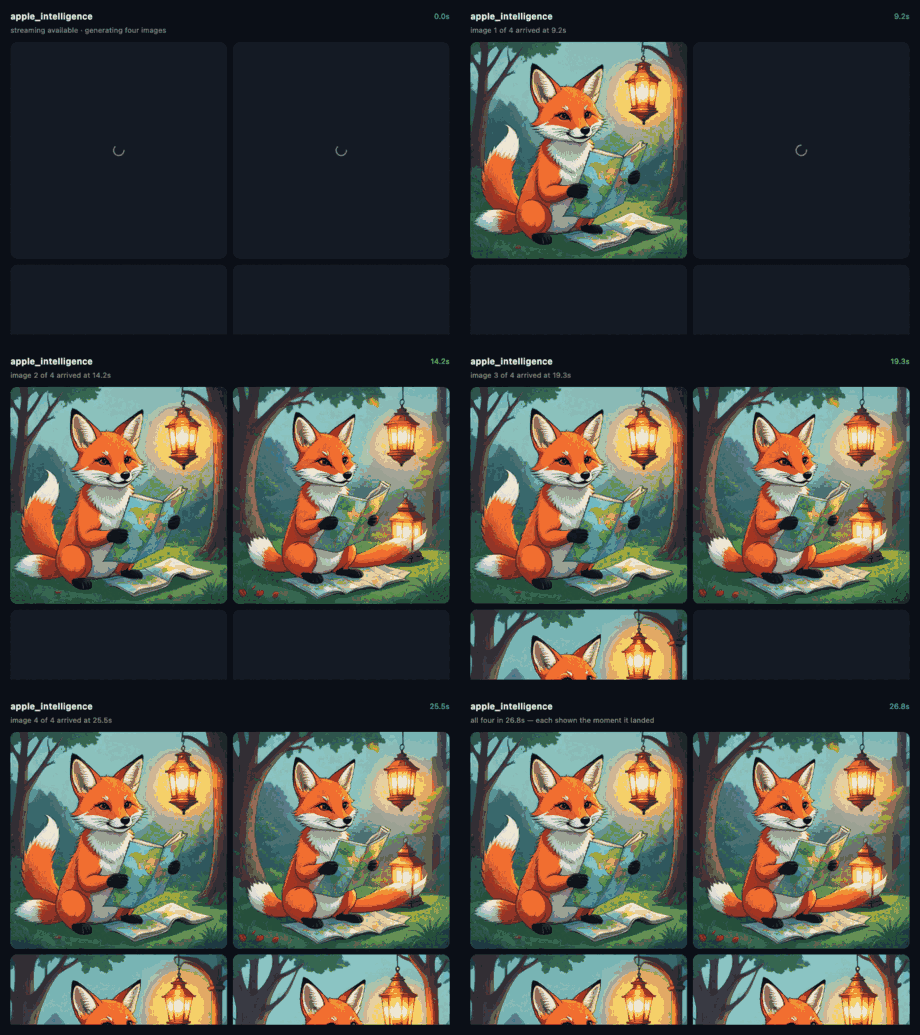
A real run, recorded from the app itself — the clock is the actual elapsed time. Four images in 28 seconds, each shown as it arrived rather than all at the end.
Why this exists
apple_foundation_models gave Flutter Apple's on-device language model. This is the other half. Every other Apple Intelligence package on pub.dev is text-only; the most-installed of them, flutter_local_ai, still lists image generation as "Planned" in its own support table.
Streaming is the point
The obvious binding here is the Image Playground sheet: present Apple's modal, get a file back. That is included, and it is the right thing on devices a few point-releases behind. But ImageCreator generates with no UI at all and hands images back one at a time, so you can show the first while the rest are still being made.
Measured on real hardware, four images at illustration style:
| first image | 6.8s |
| second image | 10.3s |
| size | ~4 MB PNG each |
Those numbers are why this is a Stream and not a Future<List>. Cancelling the subscription cancels the work on the device.
Ask before you assume
Three separate questions, because the answers genuinely differ:
final a = await ImageCreator.availability();
a.status;   // available | unavailable | osTooOld
a.sheet;    // the Image Playground sheet — iOS 18.1+
a.creator;  // streaming, no UI       — iOS 18.4+
The sheet arrived in iOS 18.1 and streaming in 18.4, so a device can perfectly well offer one and refuse the other. Styles are 18.4 too, which is why setting one on an 18.1 device is quietly ignored rather than crashing.
Errors say which kind of no
try {
  await ImageCreator.generate(concepts: [...]).drain();
} on GenerationRefusedException catch (e) {
  // e.reason: unsupportedLanguage, faceTooSmall, backgroundForbidden, …
} on GenerationUnavailableException {
  // Apple Intelligence is off, or still downloading
} on OsTooOldException {
  // this OS never had it
}
Nothing throws a bare PlatformException. "This device cannot" and "this prompt was refused" are different problems and want different handling, so they are different types.
One worth knowing about: Apple refuses image creation to an app that is not frontmost, and reports it as backgroundForbidden. That is a product rule, not a bug — it also means an integration test cannot verify generation, since the harness cannot foreground the app.
The sheet
final path = await ImagePlaygroundSheet.present(
  concepts: [ImageConcept.text('a fox reading a map')],
  style: ImageStyle.sketch,
);  // null if the user cancelled
Concepts
ImageConcept.text('…') names a subject. ImageConcept.extractedFrom(prose) asks the system to find the subjects in a passage itself, which is what makes illustrating a note or a message thread practical.
Writing Tools and Genmoji
Flutter draws its own text, which is why Apple's text features never appear in a Flutter TextField. Writing Tools attaches to a UIView; Genmoji is a property of UITextInput. Flutter's text field is neither, as far as the system is concerned.
So this hosts the real thing:
final text = NativeTextController();

AppleIntelligenceTextField(
  controller: text,
  initialText: 'Select me and try Writing Tools.',
  onChanged: (value) => setState(() => draft = value),
);

await text.capabilities();  // writingTools: true, genmoji: true
onChanged matters more than it looks. Writing Tools rewrites the text inside the native view, so without it the only way to notice would be to poll.
This is not a drop-in for TextField, and pretending otherwise would waste your time:
- It is a platform view. It composites differently and costs more than a Flutter widget — do not put dozens on a screen.
- Styling does not inherit from your theme. What the constructor exposes is what you get.
- iOS and macOS only; everywhere else it renders
fallback.
What you get for that is Writing Tools, Genmoji, and the system's own spellcheck, autocorrect and context menu — for free, because it really is the system's text view.
Requirements
iOS 18.1+ / macOS 15.1+ for the sheet, iOS 18.4+ / macOS 15.4+ for streaming, on Apple Intelligence hardware with the models downloaded. The plugin compiles into apps targeting far older systems and reports osTooOld there, so adding it does not raise your deployment target.
License
MIT © K M Shahriar Hossain