anchored_list
Jump to any index in a lazy list in constant time, and hold your place when items arrive above it. One viewport anchored at the target, not two lists cross-fading.
anchored_list
Jump to any index in a lazy list, instantly — and hold your place when new items arrive above it.
final controller = AnchoredListController();

AnchoredList.builder(
  controller: controller,
  itemCount: 1000000,
  itemBuilder: (context, index) => ListTile(title: Text('Item $index')),
);

controller.jumpToIndex(842013);   // same cost as jumping to item 3
The problem
A lazy list cannot say where item 842,013 begins, because it has never built the 842,012 items above it and does not know how tall they are. Flutter offers no answer, and the two packages that did are both abandoned — scrollable_positioned_list was archived by Google, and scroll_to_index was last published in 2022. Between them they still serve over a million downloads a month.
How this differs
The archived approach builds a second complete list anchored at the target and cross-fades to it. That is why jumping keeps two sets of children alive and why the transition is visible.
This uses the primitive Flutter already has for the job. A viewport can nominate a centre sliver, and content before it lays out at negative scroll offset. So the list splits in two at the anchor — items before it in one sliver, the anchor and everything after in another, marked as the centre. Offset zero is the anchor.
Jumping is then just re-splitting. Nothing above the anchor is built, nothing is measured, and nothing fades.
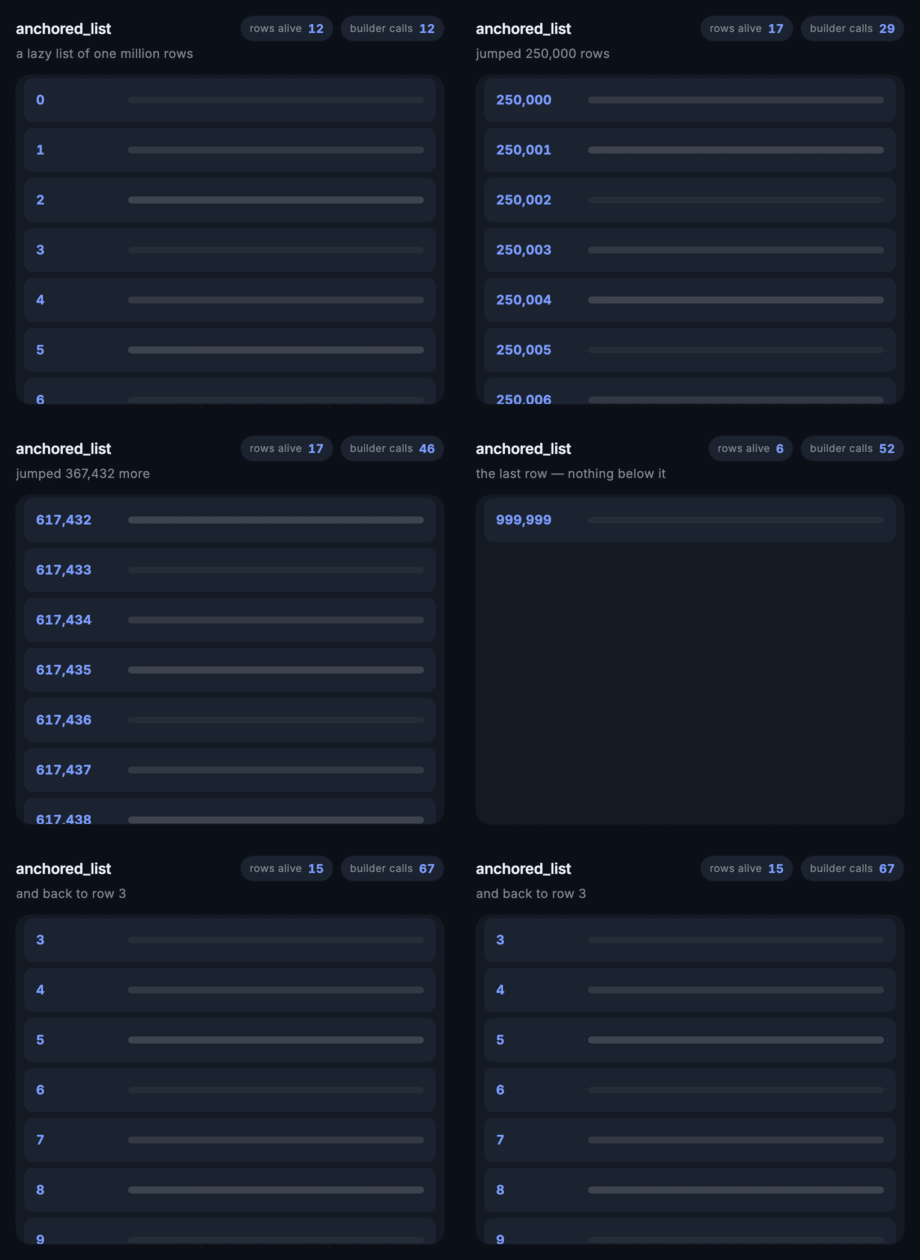
The readouts in the GIF above are live, and they are the whole argument. Every call to itemBuilder is counted:
| rows mounted | itemBuilder calls | |
|---|---|---|
| opened at row 0 | 12 | 12 |
| jumped 250,000 rows | 17 | +17 |
| jumped 367,432 more | 17 | +17 |
| jumped to the last row | 6 | +6 |
| back to row 3 | 15 | +15 |
Sixty-seven builder calls to cross a million-row list four times. The cost of a jump is the cost of one screenful, whatever the distance — and the test suite pins that, so it stays true.
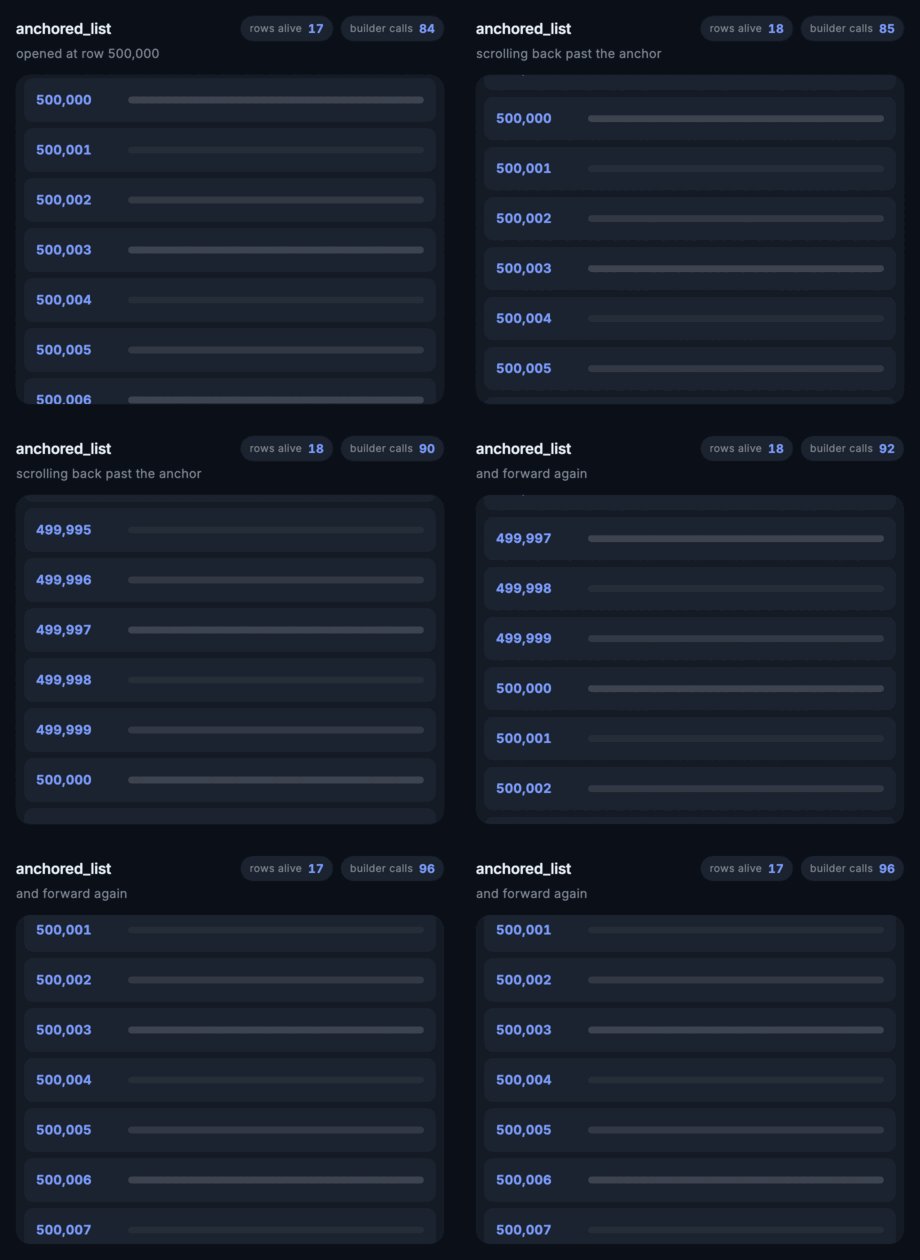
Scrolling backwards past the anchor runs the viewport at a negative offset, which is ordinary framework behaviour rather than a special case:
Older messages arriving at the top
Prepend a page of history to a normal list and every index shifts by a page, so what the reader was looking at slides down and off the screen. The usual answers are to measure the inserted items and subtract their height, or to invert the whole list and think upside down forever.
Here the anchor is an index, so the correction is arithmetic on one integer, and the scroll offset is never touched — the pixels do not move at all, even mid-item.
setState(() => messages.insertAll(0, older));
controller.itemsInsertedAbove(older.length);
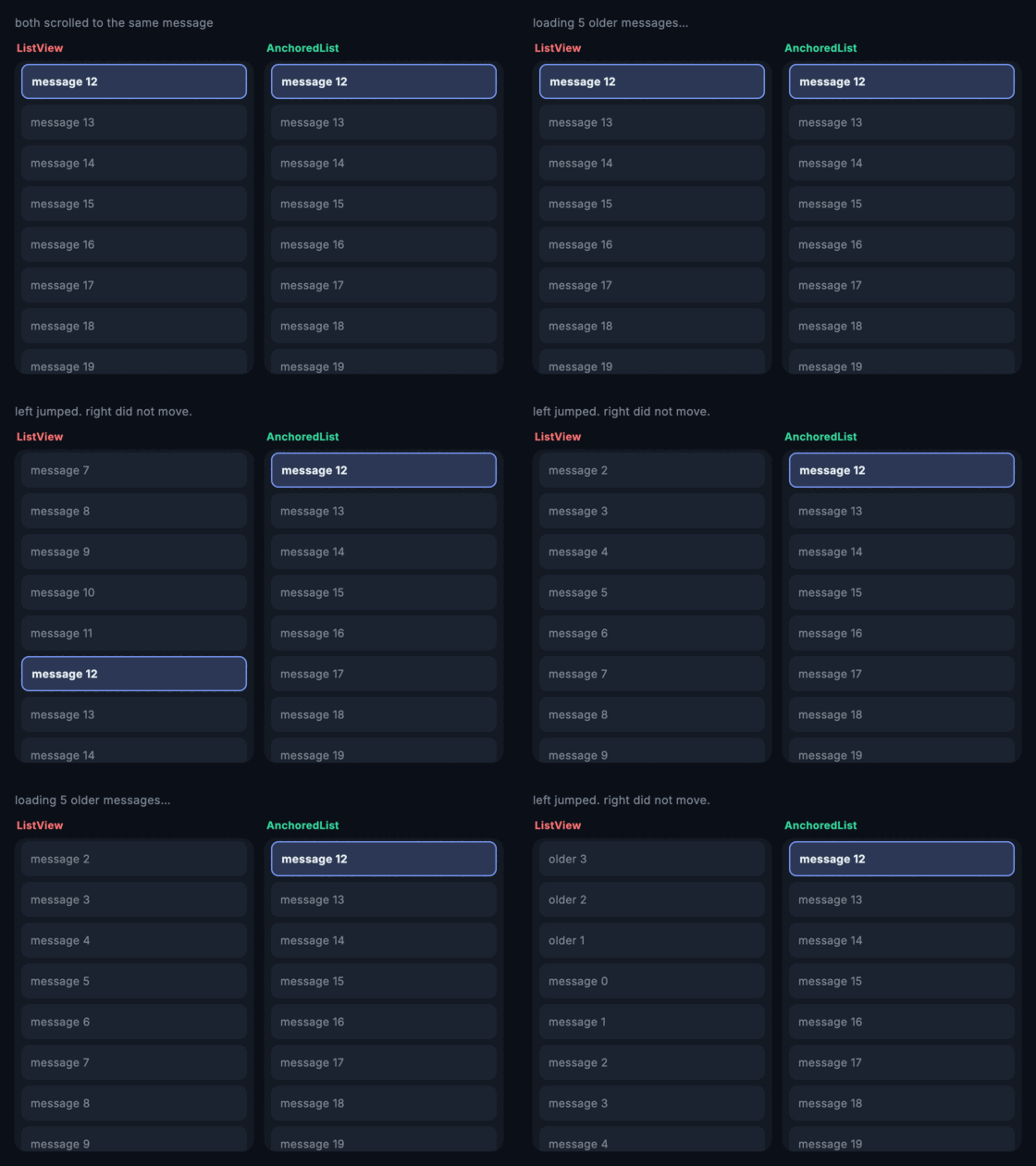
Both panels are showing the same message and receive the same five inserts three times over. The left one is a ListView. There is an itemsRemovedAbove for trimming history off the top, and items added below the anchor need no call at all, because their indices do not change.
Dragging items around
Set onReorder and every item becomes draggable, on the same terms as ReorderableListView:
AnchoredList.builder(
  controller: controller,
  itemCount: rows.length,
  onReorder: (oldIndex, newIndex) => setState(() {
    if (newIndex > oldIndex) newIndex -= 1;
    rows.insert(newIndex, rows.removeAt(oldIndex));
  }),
  itemBuilder: (context, index) => ListTile(
    key: ValueKey(rows[index].id),   // required: an item has to be findable
    title: Text(rows[index].title),
  ),
);
A long press starts the drag. Set longPressToDrag: false and wrap a handle in AnchoredListDragStartListener to put the gesture somewhere deliberate instead. proxyDecorator styles the item while it is in the air, onReorderStart and onReorderEnd bracket the drag, and screen readers get the four move actions without touching any of it.
A drag crosses the anchor. That sounds like nothing and is the whole difficulty. SliverReorderableList finds its drop index by walking only the children registered with itself, and this list is two slivers — items before the anchor in one, the anchor and everything after in the other. Dropping one of those in each half would give two separate reorder domains: drag over the anchor and the item would find no target and open no gap. So reordering here is written against the list's own index registry, which spans both slivers and does not know which one an item is in. Auto-scrolling past the anchor is free for the same reason — the two slivers share one scroll space, so crossing the anchor is just passing through offset zero.
The viewport does not lurch. A move that steps over the anchor changes how many items sit above it, which would slide everything on screen by a row. The anchor is an index, so the correction is the same single increment itemsInsertedAbove makes, and the list applies it for you.
Reordering needs an Overlay above the list for the dragged item to float in. WidgetsApp and MaterialApp both provide one.
Reaching the scroll position
The list will use a ScrollController you supply, and hands back whichever one it is using. That covers everything index-based movement does not — attaching a Scrollbar, page-up/page-down, linking two lists, reading raw offsets.
final scroll = ScrollController();

Scrollbar(
  controller: scroll,
  child: AnchoredList.builder(scrollController: scroll, ...),
);
One thing to know: offsets are measured from the anchor, not the start of the list. Zero means "the anchor is at the leading edge", and content above it sits at negative offset — that is exactly what makes a jump constant time. minScrollExtent is therefore negative whenever the anchor is not item 0.
Separators, and the rest of the ListView API
AnchoredList.separated takes a separatorBuilder on the same terms as ListView.separated. AnchoredList(children: [...]) exists for short lists.
padding, physics, reverse, scrollDirection, cacheExtent, semanticChildCount, dragStartBehavior, keyboardDismissBehavior, scrollBehavior, clipBehavior, restorationId, findChildIndexCallback and the three add* flags all behave as they do on ListView.
Two of those are worth calling out, because the split into two slivers could easily have broken them and silently did not:
paddingis divided between the slivers rather than applied to both, which would double the inset at the anchor.- semantic indexes are translated, so items above the anchor announce their real list index instead of counting backwards from it.
Where each item is
ValueListenableBuilder(
  valueListenable: controller.itemPositions,
  builder: (context, positions, _) {
    final first = positions.firstWhere((p) => p.isVisible);
    return Text('Showing item ${first.index}');
  },
);
leadingEdge and trailingEdge are fractions of the viewport — 0 is the top, 1 the bottom — so a scrollbar label, a sticky section header, or edge-triggered paging all fall out of it directly.
Alignment
controller.jumpToIndex(500, alignment: 0.5);   // centred
await controller.animateToIndex(520);          // smooth
animateToIndex scrolls normally when the target is already built. When it is far outside the built range there is nothing to scroll through, so the list re-anchors near the target and animates the last stretch. That reads as a fast scroll rather than a cross-fade.
What this does not do
No shrinkWrap. Flutter asserts !shrinkWrap || center == null, so a centre-anchored viewport can never size itself to its content. The parameter is absent rather than present and broken. If you need shrink-wrapping, use ListView(shrinkWrap: true) and give up constant-time jumps — that trade runs the other way, and scrollable_positioned_list makes it, which is the one thing its design does better.
Not a sliver. It owns its viewport, because owning the viewport is what makes the centre trick work, so it cannot be nested in another CustomScrollView.
Both follow from the same decision. If they matter more to you than jump cost, this is the wrong widget, and the README would rather say so than have you find out in a layout assertion. They are also, between them, the two most-requested features on the archived package's tracker — so if that is what brought you here, this is not the successor you want.
License
MIT © K M Shahriar Hossain